
If you're looking for Nike hoodies on your phone, the common issue isn't "where is the most product?" but how to quickly filter out candidates worth further checking for color, size, price, and link from the visible product cards. fashionreps' catalog is good for discovery and initial browsing, while Google Sheets is good for organizing candidates into comparable, reviewable records.
This article only discusses one task: using your phone to filter Nike hoodie candidates and decide which products are worth entering pre-purchase review. The verification date for the fashionreps page features in this article is October 9, 2026; prices, inventory, sizes, product links, and shopping agent pages should still be re-confirmed when preparing to order.
First Clarify the Phone Filtering Task and Evidence Scope
The goal of filtering is not to buy immediately, but to get a controllable, evidence-complete candidate list. Each candidate should at least record the following information:
- Product name and catalog category
- Reference price shown on the page and verification date
- Visible information such as color, size, and material
- Product detail page or external shopping agent link
- Whether there are QC images or other visible verification materials
- Current status of being openable
- Issues that need further confirmation
fashionreps' page positioning is to help users discover products, view category content, and compare shopping agents. Orders, payments, and shipping are handled by the shopping agent chosen by the user, so the reference prices in the catalog should not be directly understood as the final cost delivered. Shipping fees, service fees, taxes, exchange rates, and return/exchange conditions all need to be confirmed separately on the agent's website.
If your goal is to manage dozens of candidates in bulk, collaborate with multiple people, or keep a filtering history, relying only on the phone catalog can easily miss information. Conversely, if you just want to quickly browse a few styles, opening the catalog first and then deciding whether to build a spreadsheet usually saves steps. 📱
Verifying Categories and Product Cards in the nike Catalog on fashionreps
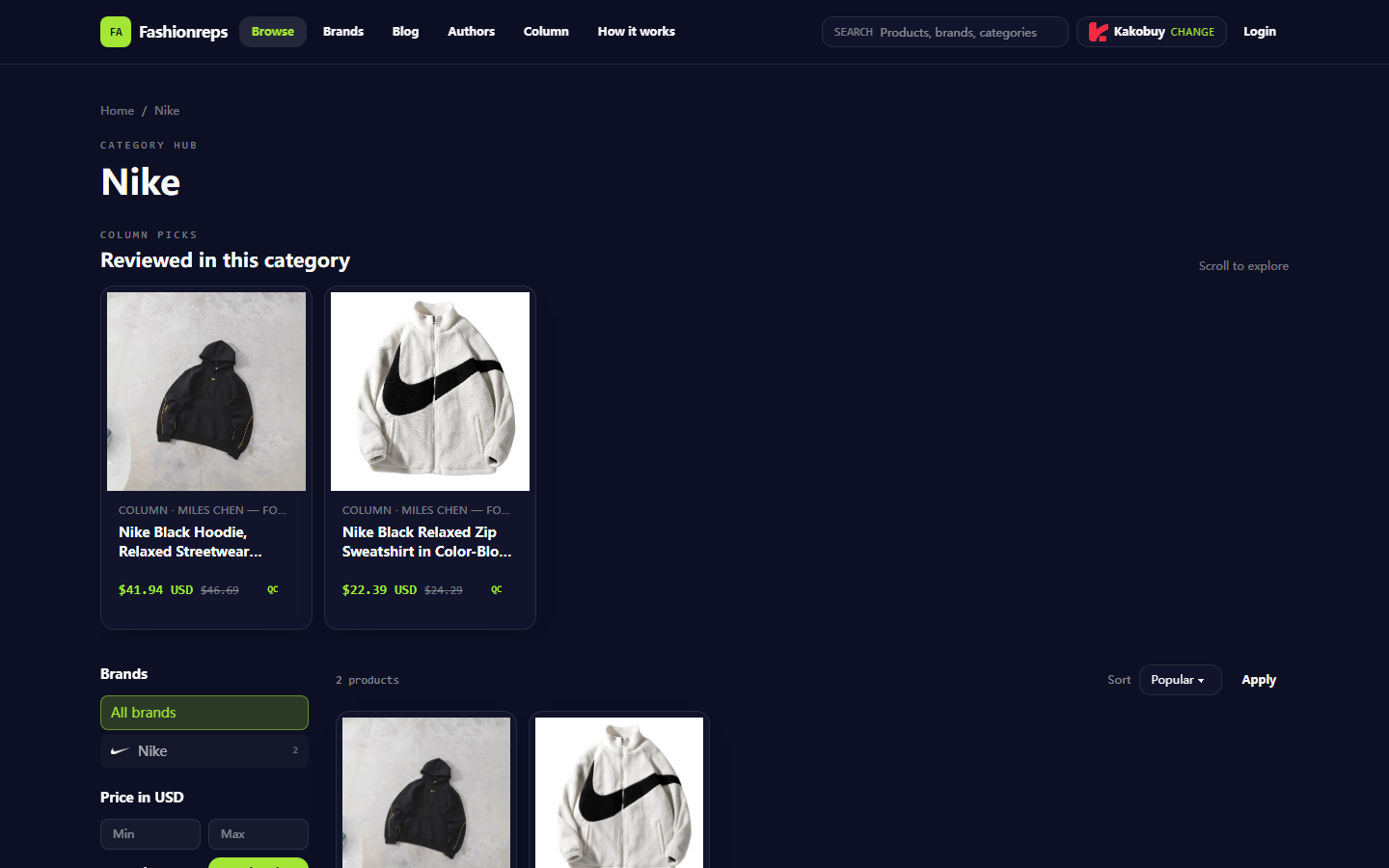
As of the verification date, fashionreps' Nike category page appears as a brand category entry, with the page containing category navigation, filter area, sorting options, and product cards. The visible Nike hoodie candidates on the page include two items:
- Nike Black Hoodie, Relaxed Streetwear Pullover with Cotton Face and Fleece Lining, reference price $41.94, and the page also shows a previous reference price of $46.69.
- Nike Black Relaxed Zip Sweatshirt in Color-Block Fleece with a Stand Collar, reference price $22.39, and the page also shows a previous reference price of $24.29.
These numbers can only be used as a reference at the time of page verification, not as final prices or current inventory. The titles and prices in the product cards are suitable for initial filtering, but cannot replace the product detail page, shopping agent page, or inventory confirmation before ordering.
When browsing on your phone, you can first narrow the range using the Nike brand category and hoodie-related pages, then view by popular, newest, price low to high, or price high to low. Don't just save the name of filtered products, because similar titles may correspond to different fits, zipper structures, collars, or fabric descriptions.
It's recommended to check three things immediately after opening each candidate:
- Whether the product card and detail page are still accessible.
- Whether the page has a clear product name and sufficient visible information.
- Whether the page provides a product entry that can be followed up, rather than just category tags or blank pages.
If the page redirects, shows 404, has empty content, or only shows category names without product information, don't count it as a valid candidate. 🔎
Using Google Sheets to Record Color, Size, and Link
The value of Google Sheets is not to replace the product catalog, but to consolidate scattered information from multiple pages into the same row. On mobile, you can start with a simple spreadsheet to avoid adding operational burden by recording all details.
Recommended fields:
| Field | Recording Method | Review Focus |
|---|---|---|
| Product Name | Copy the visible title from the page | Check if it matches the detail page |
| Color | Record the color explicitly stated on the page | Don't guess color names from images |
| Size | Record size information shown on the page | Mark as pending confirmation if no size chart |
| Reference Price | Record amount, currency, and date | Don't treat as final delivered price |
| Product Link | Save a page address that remains accessible | Regularly check for expiration |
| Image or QC Status | Record whether there are corresponding materials | Don't treat ordinary product images as QC evidence |
| Next Step | Write down pending confirmation items | For example, confirm inventory, size, or agent fees |
Color and size fields especially benefit from consistent notation. For example, color can be unified as "black", "gray", "other pending confirmation", and size can keep the original page identifier, with a note indicating whether a size chart exists. Don't write content that looks like a certain color in the image as a page fact.
If multiple people are filtering together, you can add fields for each candidate such as "Owner", "Last Verification Date", and "Status". For status, it's recommended to use only a few clear options, such as "Pending Verification", "Comparable", "Need Evidence", "Link Expired", and "Temporarily Not Considering". This way, it's less likely to be distracted by too many tags when filtering on the phone. ✅
Step Comparison: Search, Category Browsing, and Spreadsheet Filtering
The three operations solve different problems. Catalog search and category browsing are for discovery, while Google Sheets is for organizing and reviewing.
| Operation | Problems Better Solved | Limitations on Mobile |
|---|---|---|
| On-site Search | Finding related content by brand or product keywords | Results still need page-by-page verification, cannot replace field recording |
| Category Browsing | Observing product range and page sorting in a category | Similar products easily confused, history not centralized |
| Google Sheets Filtering | Narrowing candidates by color, size, price, or status | Cannot automatically prove product information is true or still valid |
A practical workflow is to first discover candidates on fashionreps, then add items with clear product names and accessible entries to the spreadsheet. After adding, use Sheets' filter function to view items such as "black", "has size information", "price below a certain budget", or "pending confirmation". Finally, reopen the original page to verify, rather than relying only on old records in the spreadsheet.
This division of labor can reduce switching back and forth: the catalog provides context, and the spreadsheet establishes comparison criteria. It cannot guarantee faster filtering or prove that a product is more worth buying; actual efficiency depends on the number of candidates, network conditions, and completeness of page information.
Verification Boundaries for Product Images, QC Images, and External Links
Product main images are mainly used to identify the style and page object. They can help you distinguish pullover hoodies, zip hoodies, stand collars, or color-block designs, but cannot prove fabric feel, actual thickness, fit, or workmanship after receipt.
If QC images are clearly labeled as QC or quality verification materials on the page, they can be used as an entry point for further inspection, but you should still confirm the product, color, size, and order status corresponding to the images. You cannot interpret a clear image as having personally inspected the product, nor write ordinary display images as QC evidence.
External links require special attention to three boundaries:
- Shopping agent entries in the catalog may change based on the agent selected by the user.
- Prices, inventory, shipping fees, and service fees on external pages may differ from the catalog page.
- A page being accessible does not mean the product is in stock or can be shipped to your destination.
Therefore, you can set four statuses in the spreadsheet: "Catalog page verified", "Agent page pending verification", "Price pending update", and "Link pending review". Don't compress all statuses into a single "Confirmed", as that can easily lead to mistaking discovery-stage information for order basis. 🧾
Combined Workflow of Website Catalog and Google Sheets
You can complete a phone filtering session in the following order:
- Open the Nike hoodie-related catalog on fashionreps and first confirm that the current page belongs to the target category.
- Use brand, price, or sorting and filtering options provided by the page to narrow the browsing range.
- Open candidate products and confirm the product name, visible description, reference price, and image information.
- Add candidates that meet basic conditions to Google Sheets and record the verification date.
- Filter out a small number of candidates by color, size, price, and evidence status.
- Reopen the original pages and check whether the links, prices, and page content in the spreadsheet are still consistent.
- For candidates that need to be purchased, go to the shopping agent page and separately verify inventory, size, fees, shipping routes, and return/exchange conditions.
The "Next Step" field in the spreadsheet should be written as actionable items, such as "Confirm whether the target size is still available in black", "Open the agent page to check current price", or "Supplement size chart". Don't write descriptions like "looks good" that cannot drive filtering.
If there are only two or three candidates, using the catalog directly and recording in the phone's notes may be sufficient. If there are more than ten candidates, or if you need to compare multiple colors and sizes, the value of Google Sheets increases significantly. If multiple people are involved, agree on field meanings and status names before starting data entry to avoid different people interpreting the same status differently.
Information Update Time and Checking Expired Links
Both catalogs and spreadsheets may retain outdated information, so every time you prepare to continue purchasing, you should perform a small-scale review. Focus on checking the following:
- Whether the page title still corresponds to the original product.
- Whether the reference price on the page has changed.
- Whether the previously recorded color and size are still visible.
- Whether the product link jumps to the same product, not another page.
- Whether images or QC materials still correspond to that candidate.
- Whether the shopping agent page shows new fees, inventory, or shipping restrictions.
You can keep a "Last Verification Date" in the spreadsheet and prioritize reviewing candidates with earlier dates, large price changes, or those ready for immediate ordering. Don't delete expired links directly; mark them as "Link expired" first, to avoid searching for the same item repeatedly and to distinguish between temporarily unavailable and unverifiable records.
For price and availability, the verification date is more important than old numbers in the spreadsheet. This article records page-visible information as of October 9, 2026, and should not be taken as real-time inventory or quotes on later dates. ⏱️
Pre-Order nike Candidate Review Checklist
Before moving from the candidate list to the shopping agent page, you can confirm the following items one by one:
- [] Product name matches the catalog record.
- [] Color is an option explicitly provided on the page, not inferred from images.
- [] Target size and size information have been viewed.
- [] Reference price, currency, and verification date have been recorded.
- [] Product link opens and points to the correct page.
- [] Ordinary product images and QC images have not been confused.
- [] Inventory and current price on the shopping agent page have been re-confirmed.
- [] Service fees, shipping fees, taxes, shipping routes, and return/exchange conditions have been viewed separately.
- [] Pages for which evidence needs to be kept have been recorded with the corresponding date and pending items.
The final choice should not be determined solely by catalog ranking or a lower reference price. A candidate with a lower price but missing size information, unstable links, or unverifiable inventory on the agent page may have less actual decision-making value than a candidate with a slightly higher price but more complete information.
Using the fashionreps catalog to discover products and then Google Sheets to manage candidates separates "browsing" from "comparing": the former helps you find possibly relevant Nike hoodies, while the latter helps you identify which information has been verified and which still requires action. This combination is suitable for those who need multi-criteria filtering and follow-up review; if you just want to quickly check a few styles, using the catalog alone is simpler. Regardless of the method, you should not treat catalog reference prices, product images, or old links as final purchase commitments.
Agent Platform Shopping FAQ
1. What should I do if I'm not happy with the product I received through uufinds.tips?
Contact uufinds.tips customer support right away. For most non-specialty goods purchased from Chinese sellers, uufinds.tips offers a 5-day unconditional return and exchange window. If you want to send the item back, you can do so. If the item has already been delivered to your address and you find a defect, reach out to uufinds.tips customer service so they can contact the seller on your behalf and work out a resolution.
Support email addresses:
kakobuy: service@kakobuy.com
oopbuy: support01@oopbuy.com
usfans: support@usfans.com
hipobuy: care@hipobuy.com
superbuy: care@superbuy.com