This article solves a specific task: when you're looking for Polo Ralph Lauren fall/winter knit tops on fashion-reps, how to find candidate items from the website-style catalog, then use Google Sheets to record sizes, colors, product links, and review status, reducing the need to repeatedly open pages or select the wrong variant.
This article is based on the currently visible information on the fashion-reps Polo Ralph Lauren category page to explain navigation and recording methods. Product names, reference prices, filter options, and link status on the page may change. Before purchasing, you should re-check the product page, available variants, seller information, shipping costs, and destination country taxes. This article does not apply to scenarios that require authenticity verification, guaranteed fabric composition, or actual QC replacement. 🧭

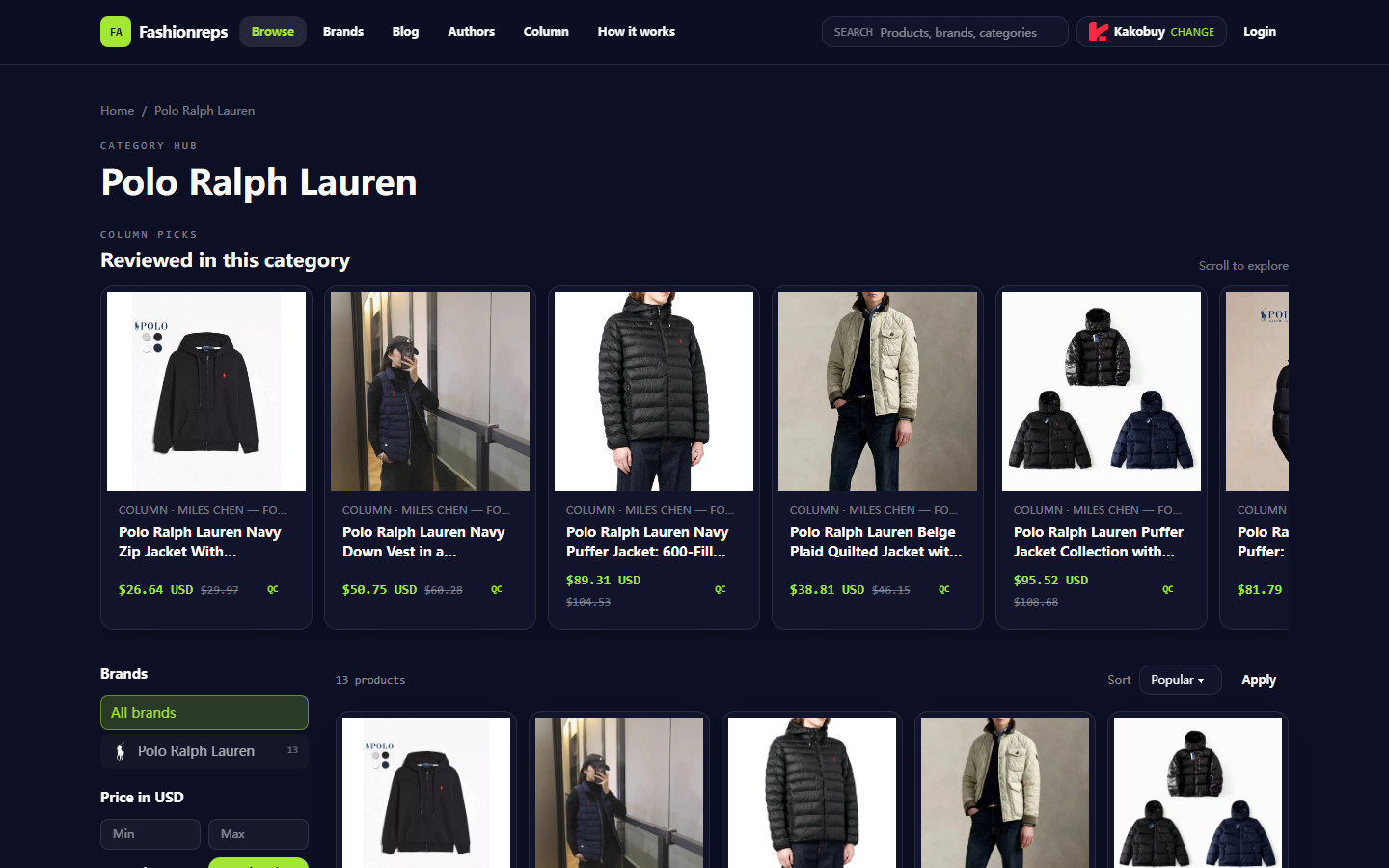
Image: Example of visible filters and product cards in the Polo Ralph Lauren category catalog on fashion-reps.
Clarify the filtering task and evidence boundaries for fall/winter knit tops
First, limit the task to "find Polo Ralph Lauren knit top candidates suitable for fall/winter and record sizes, colors, and reviewable links." Do not expand it into brand authenticity verification, warmth performance testing, or final purchase advice.
The currently visible page information mainly includes brand category, product titles, reference prices, partial color or construction descriptions, product count, price filtering, sorting options, and QC labels. This information is suitable for initial screening, but cannot alone prove the following:
- Whether current inventory and specific sizes can be ordered.
- Whether the material description in the page title matches the physical label.
- Whether the color in the image is the same as the color name in the variant options.
- Whether the reference price includes domestic shipping, international shipping, taxes, or service fees.
- Whether the QC label means that inspection has been completed for the size and color you selected.
Therefore, each field in the spreadsheet should distinguish between three states: "displayed on page," "to be confirmed on product page," and "cannot be confirmed." 🧾
Search by brand and category on the fashion-reps website-style spreadsheet
After opening fashion-reps, you can first enter the Polo Ralph Lauren brand category, then observe the product cards in the catalog. The currently visible page includes brand filtering, price range filtering, and options to sort by popularity, newest, price low to high, or price high to low. The page also shows the number of products, which helps determine if the filter is working.
For fall/winter knit tops, you can search in the following order:
- First confirm that the page is still in the Polo Ralph Lauren brand category, not a general clothing search result.
- Look for knit tops, sweaters, wool sweaters, zip-up knits, or similar construction words in the product titles.
- Record candidate items first; do not place an order immediately just because the price is low or the image color is attractive.
- Open the product card to confirm whether the product page is still accessible and whether size and color variants exist.
- Exclude items that are only jackets, down jackets, vests, or other non-knit structures.
The "QC" text on the page can be used as an entry point for further viewing, but should not be directly interpreted as all details have been verified. The catalog is suitable for discovering candidates, and the product page is the main evidence source for recording variants and links. 🔍
Use Google Sheets to create a record of sizes, colors, and links
The role of Google Sheets is not to replace the product catalog, but to organize information scattered across multiple product pages into a filterable, reviewable record. It is recommended that one row corresponds to one specific product candidate; if different colors or sizes of the same product need to be confirmed separately, they can be split into multiple rows.
| Field | Suggested input | Evidence status |
|---|---|---|
| Product name | Copy the complete name currently displayed on the page | Displayed in page title |
| Product link | Save the product detail page URL | Must reopen to confirm |
| Category | Record as Polo Ralph Lauren and specific clothing type | Category page or product page |
| Color | Use the original name in the variant; do not translate into a more specific color code | Confirm on product page |
| Size | Record available sizes and link to size chart or screenshot location | Confirm on product page |
| Page reference price | Record the currency and amount displayed on the page | Recheck before publishing |
| Material description | Only fill in what the page explicitly states | Not equivalent to physical testing |
| QC status | Record whether the QC entry can be opened and the verification date | Cannot replace full inspection |
| Review date | Use YYYY-MM-DD format | Update after each re-view |
| Notes | Record missing fields, variant differences, and stop reasons | Manual judgment |
You can first create filtered views, such as "size to be confirmed," "color confirmed," "link expired," "need to recheck price." Do not automatically fill blank fields with "in stock" or "standard size," as this would disguise unknown information as fact.
Compare viewing methods of product cards, spreadsheet fields, and image evidence
Product cards are suitable for quickly comparing titles, appearance direction, and page reference prices. Their advantage is continuous browsing and easy discovery of multiple candidates under the same brand; the limitation is that cards usually do not fully display sizes, color inventory, seller details, or shipping conditions.
Google Sheets is suitable for cross-comparison. You can fix the product name and link columns, then filter by color, size, price, or review status. For selection tasks that require collaboration, you can add columns for "reviewer," "last modified time," and "pending issues," but collaborators should avoid overwriting the original page names and links.
Image evidence can only support what is actually visible in the image, such as silhouette outline, collar structure, zipper position, embroidery, or color scheme. It cannot prove hand feel, thickness, warmth, actual material ratio, or wearing effect. 🧶
If the product card and the product detail page have inconsistent names, keep both texts and mark the difference; if the color shown in the image is inconsistent with the variant name, treat the current selectable variants on the product page as the object to be confirmed, rather than naming it yourself based on the image.
Check links, variants, page update time, and currently visible information
Each candidate should undergo at least one review from catalog to product page. After opening the link, record in the following order:
- Whether the product page opens normally, or if there is a redirect, blank page, or failure to load.
- Whether the product name still matches the catalog card.
- Whether size options exist, and whether there is a size chart, measurement method, or unit description.
- Whether color options match the image and title.
- Whether the page indicates stock, pre-sale, out-of-stock, or other restrictions.
- Whether the price still shows the same currency and amount, and whether it notes that shipping or other fees are not included.
- Whether the page has an update time, seller information, or other fields that help judge timeliness.
- After selecting a product variant, whether the link still returns to the same product page.
When there is no clear update time on the page, do not infer that the information is current. Recording the "review date" only indicates when you viewed the page, and does not guarantee that it remains valid afterward. Prices and inventory especially need to be reconfirmed before submitting an order. ✅
Scenarios where website-style catalogs and Google Sheets are applicable
Website-style catalogs are more suitable for discovering products, narrowing down by brand or price, viewing product images, and entering detail pages. They retain product context and are suitable for initial browsing and finding new candidates.
Google Sheets is more suitable for organizing already discovered products, especially when comparing multiple sizes, colors, links, and review statuses. It can help you find duplicate products, missing fields, and records that have not been reviewed for a long time, but it will not automatically prove that product pages are still accessible, nor will it complete inventory or variant verification for you.
The most reliable division of labor: catalog for discovery and navigation, product page for fact confirmation, and Google Sheets for recording and rechecking. Do not treat old prices, old images, or old notes in the spreadsheet as current product status.
Recording and review process when used in combination
You can adopt the following lightweight process:
- Filter fall/winter knit top candidates in the Polo Ralph Lauren category.
- Create a row for each candidate, first saving the name, catalog position, and product link.
- Enter the product page and fill in size, color, page reference price, and material original text.
- Mark the verification date and evidence location for each filled field.
- Use the spreadsheet to filter records with missing sizes, unclear colors, invalid links, or outdated page information.
- Only include products that have completed key field review on the purchase list.
- Before submitting the order, reopen the product page to confirm the final variant, price, shipping, taxes, and purchase platform options.
If you need to select multiple colors or sizes, it is recommended to record "product-level information" and "variant-level information" separately. Product name and detail page link can be repeated, but color, size, inventory, and review status should be filled per variant to avoid one record representing multiple unconfirmed options.
Stop conditions and next actions when information is insufficient
In the following cases, stop adding the product to the confirmed list:
- The product page cannot be opened, or the link redirects to an unrelated page.
- There is no clear size selection on the page, and no reference size chart.
- The color only appears in the image, and the variant name cannot be confirmed.
- A catalog price exists, but the product page has no corresponding currency or current price.
- The product structure shown on the page is inconsistent with fall/winter knit tops.
- Only the catalog card is visible, and the detail page information cannot be verified.
The next step can be to mark these records as "pending evidence," then re-view the product page or choose other candidates. Do not fill gaps with size, color, or material information from similar products, and do not skip the final page review just because the spreadsheet looks complete.
This combined method mainly saves time on repeated searching and organizing, at the cost of maintaining the spreadsheet and bearing the risks of page changes, link expiration, and variant updates. It is suitable for people who need to compare multiple candidates, collaborate with others, or keep review records; if you are only purchasing one product with clearly identified size and color, it may be simpler to confirm item by item directly from the current product page. It is not recommended to place an order based solely on catalog cards and old spreadsheet records without product page evidence, clear variants, or ability to verify current prices.