Introduction
If you're hunting for Hermes scarves on fashion-reps, the real challenge usually isn't "which tool looks more professional"—it's how to confirm that candidate products, colors, images, and links all refer to the same item, and how to save entries that still need a second look.
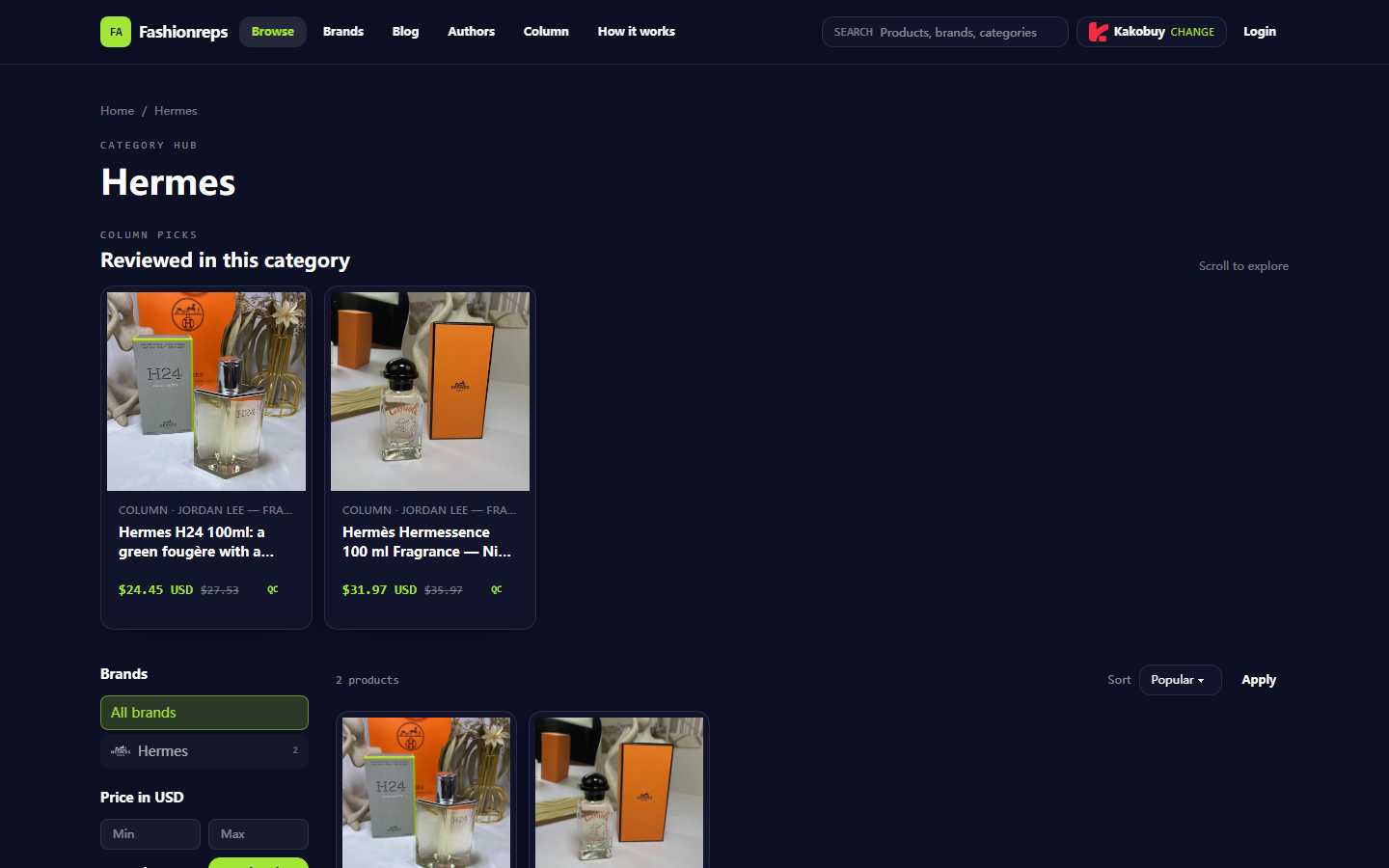
This article focuses on one specific task: first check the product information actually visible in the fashion-reps catalog, then use Google Sheets to build a filterable, annotatable, and re-checkable candidate list. The current page verification materials show that the Hermes category page actually displays 2 fragrance products, not scarf products. Therefore, you cannot cite product names, prices, or images from that page as evidence of Hermes scarves. The method below emphasizes recognizing such mismatches between catalog and target category, and avoiding mistaking catalog visibility for stock or purchase availability. 🧭

Clarify the specific task for filtering hermes scarf candidates
The filtering task can be broken into four actionable steps:
- Confirm whether the page really belongs to Hermes scarves, not other categories under the brand.
- Record each candidate's product title, color or color description, specifications, image, and product page entry.
- Cross-check the information on the page with the records in the table to avoid similar titles with different links.
- Save entries that cannot be confirmed on the spot, and revisit the original product page later for verification.
This method is for readers who need to build a candidate pool, compare colors, organize images, and keep review records. It is not for treating catalog cards as proof of stock, price commitment, authenticity, or completed purchase process.
Verify the actually visible scarf cards, images, and fields in the fashionreps site spreadsheet
Verification should start from what the page actually displays, not from search terms or expected results. In the current materials, the fashion-reps Hermes category page shows brand filters, price filters, sorting options, and product cards, but the visible cards are Hermes H24 100ml and Hermessence 100 ml Fragrance; the page provides no visible evidence of Hermes scarf cards.
The page also shows that Fashionreps aims to help users discover products, view available QC images, and read shopping guides; purchasing, payment, and shipping are handled by external shopping agent websites. This confirms it is a product discovery and information organization entry point, not an order system that can confirm inventory, final price, shipping costs, taxes, or after-sales service.
When building a candidate list, check item by item:
- Does the product title clearly include scarf or the relevant category information?
- Does the page have color, material, size, or other fields sufficient to distinguish candidates?
- Does the image correspond to the current product card or detail page, not decorative brand page images?
- Is the product entry still accessible, and does it not redirect to an empty page, tab, or other product?
- Does the displayed price include currency, verification date, and applicable conditions?
If the category does not match, mark the result as "to be confirmed" or "excluded," rather than rewriting it as a scarf candidate. 🔎
Set up color, specification, image, link, and update time columns in Google Sheets
The value of Google Sheets is turning a one-time browse into a maintainable record. It's recommended to use one row per candidate product, with at least the following fields:
| Field | Record content | Verification focus |
|---|---|---|
| Candidate ID | Internal number for discussion and review | No duplicates, does not change with sorting |
| Product title | Title as displayed on the page | Do not supplement title based on keywords |
| Category | Scarf, fragrance, or to be confirmed | Confirm category before comparison |
| Color | Color or original description shown on the page | Leave blank and mark missing if no color info |
| Specification | Visible info such as size, material, model | Distinguish page facts from personal inference |
| Image | Image URL or image note | Confirm image corresponds to current candidate |
| Product link | Entry to return to current product page | Recheck if it still points to the same object |
| Page status | Accessible, redirect, empty page, to review | Update after each verification |
| Verification date | Date of last check | Time-sensitive facts must have a date |
| Notes | Color doubts, missing images, or duplicate clues | Record only actionable information |
Colors should not be forcibly normalized. For example, if the page shows "dark brown," "brown," and "coffee," you can keep the original description and add a "comparison color" column for manual categorization. This preserves the page's original text and facilitates later filtering.
An image column is not image evidence. You should also record whether the image is clear, whether colors can be identified, whether it belongs to the current product, and whether you have a source and usage basis for publishing it. Images whose source or correspondence cannot be confirmed should not be used to prove material, actual color difference, or product quality.
Compare site search, category browsing, and spreadsheet filtering with the same batch of hermes candidates
Site browsing is good for discovering candidates. Users can start from brand entry, category page, search box, sorting, and price filters to quickly judge whether the target category exists in the current catalog. Its advantage is preserving the context of product cards—you can see titles, images, and page organization.
Spreadsheet filtering is good for organizing already discovered candidates. It can filter by color, category, page status, verification date, or to-do items, and can add notes and manual review results. It cannot automatically prove that page information is true, nor replace returning to the product page for verification.
It's recommended to use the same batch of candidates for comparison:
- In fashion-reps, record where candidates appear and the page title.
- Write the original title, color, specification, image status, and product entry into the table.
- Use the table to filter entries with the same color or specification.
- Return to the site and open links one by one to confirm the page has not drifted to a different object.
- Update page status for invalid, redirected, or category-mismatched entries.
Do not interpret "there is a row in the table" as "the product is available to buy." The table is just a recording layer, the website page is the current visibility verification layer, and external shopping agents may provide ordering, payment, and shipping information. 🗂️
Check whether product title, color, image, and link point to the same product object
Checking whether the same product object is referenced requires simultaneously observing title, image, specification, and page entry. The title containing Hermes or a color name alone is not enough to prove that the four pieces of information correspond to each other.
You can add an "object verification result" column in the table with the following statuses:
- Matched: Title, image, specification, and product entry are consistent with each other.
- Partially matched: Title and link are consistent, but color or specification information is missing.
- Suspected duplicate: Different cards use the same or similar title; need to open detail page to judge.
- Object drift: Link opens to show a different product or category.
- Unable to verify: Page inaccessible, image unclear, or key fields missing.
For the current verification materials, the two visible cards on the Hermes page are fragrances and cannot be included as Hermes scarf candidates. If scarf entries appear on the page later, their actual titles, images, colors, and links should be recorded anew, not carried over from fragrance card data.
Compare site visual browsing with Google Sheets for long-term organization, notes, and collaboration
The site is better for first discovery and quick browsing. Images, cards, brand filters, and sorting help users judge whether the catalog is worth further review, but page information may change over time and does not necessarily retain personal comparison reasoning.
Google Sheets is better for long-term organization. It can save color judgments, exclusion reasons, review dates, and team notes, and makes it easy to separate statuses like "confirmed," "awaiting images," and "link broken." In multi-person collaboration, agree on who is responsible for page verification, who records images, and who makes final candidate confirmation, to avoid multiple people overwriting the same field simultaneously.
When combining the two, keep this order: site for discovery, spreadsheet for recording, back to site for rechecking, and external shopping agent for actual purchase. Do not copy manual notes from the table as site facts, nor write the site's current visible status as a long-term guarantee. ✍️
Explain that catalog visibility does not equal stock, price, or final product availability
The appearance of a product card in the catalog only means that content was visible on the verification date. It does not equal current stock, nor does it equal the external shopping agent having accepted an order.
Prices, shipping costs, taxes, available colors, sizes, stock, QC images, shipping routes, and after-sales conditions may change. Before publishing or ordering, reconfirm the destination country, currency, applicable conditions, and the latest information on the external agent's page. For customs and clearance, do not reduce costs by under-declaring, splitting orders to avoid taxes, or evading inspection; declare truthfully according to destination country rules and prepare required documents. ⚠️
If a page has only brand tags, search snippets, or links that cannot be opened, it should not be counted as a valid product page. Only when the page is accessible, the product name is clear, and there are visible fields sufficient to support the current judgment should it enter the candidate list.
Final action: save a candidate list that can be re-checked against the current product page
After filtering, keep a re-checkable candidate table, not just color names or screenshots. Each retained entry should have at least the original title, category, color, specification, image status, product link, page status, and verification date.
It's recommended to divide candidates into three groups:
- Keep: Category correct, page accessible, key fields mostly complete.
- To review: Has potential value, but lacks confirmation of color, image, specification, or link.
- Exclude: Category mismatch, page dead, object drift, or insufficient evidence.
The conclusion supported by current materials is: the fashion-reps Hermes page can serve as a catalog verification entry, but what is seen is two fragrance products and cannot directly serve as a source of Hermes scarf candidates. The next step is to search again for actual scarf cards, enter them one by one into Google Sheets, and return to the page for rechecking before each comparison or purchase.
This process may save time on repeated searching and re-judging, but it increases the workload of maintaining the table, updating links, and re-verifying pages. It is more suitable for people who need to compare multiple colors, keep image clues, collaborate with others, or continue decisions over time; if you only want to browse one product temporarily, the cost of building a full table may not be worth it.