If you are planning to buy eric emanuel shorts, do not regard the reference price or promotional discount displayed on the product page as the final discount. A more reliable approach is to separately check the product style, color, and size, then confirm the coupon's applicable scope, and finally take the actual amount payable on the checkout page as the standard.

Currently Verifiable Product Information
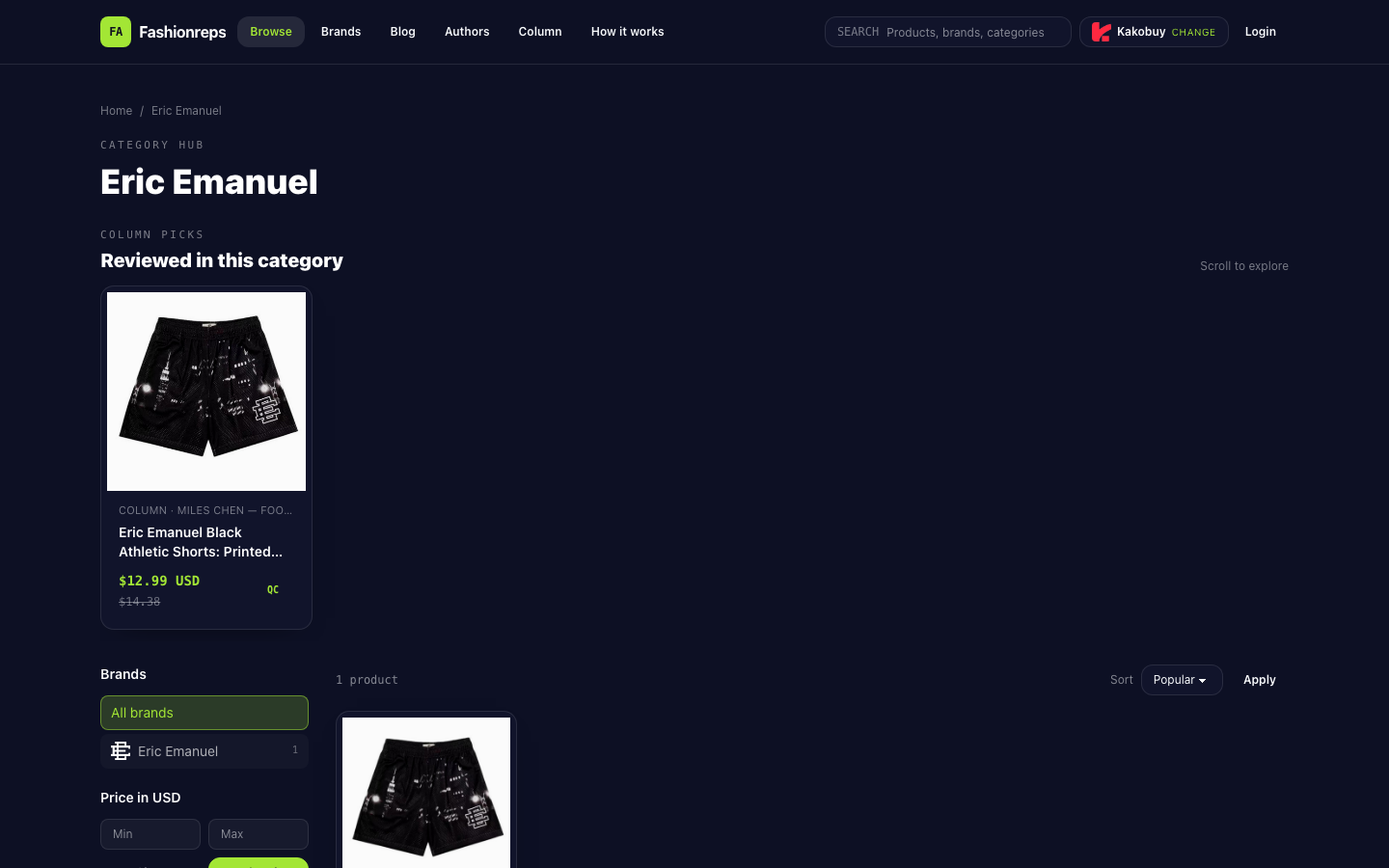
Fashionreps currently shows an Eric Emanuel category page with a black athletic shorts, described as printed polyester blend, with size range S–6XL, a reference price of $12.99, and a previous reference price of $14.38 displayed on the page. The page also indicates that QC photos can be viewed.
This information can only help you confirm the product candidate, but cannot prove the existence of a usable coupon or guarantee a discount at checkout. The currently provided product data does not include a verifiable coupon code, minimum spending threshold, expiration date, exclusions, or actual checkout amount, so it cannot be asserted that you will save money when purchasing.
First Confirm Which Style the Coupon Applies To
After opening the product page, first record the following information:
- Product name and color, for example, black athletic shorts.
- The size range displayed on the page, currently visible as S–6XL.
- The product page reference price and whether the page still displays the same price.
- Whether the product is still available in your target color and size.
- Where the coupon entry appears: on the product page, in the cart, or at checkout.
If the coupon only applies to specific products, colors, sizes, or event inventory, you cannot infer that this pair of shorts is eligible just because other products under the same brand or category are eligible. It is more reliable to verify after selecting specific colors and sizes than just browsing the brand category page.
Check the Coupon in Order
1. Check the Entry and Conditions on the Product Page
First check whether a coupon entry, event description, or copyable coupon code appears on the product page. Record the applicable products, minimum spending, expiration date, and exclusions clearly stated on the page. If the page only shows a change in reference price without clearly stating the coupon rules, do not treat the price difference as a post-coupon discount.
2. Reconfirm After Adding to Cart
Add the target color and size to the cart, and check whether the product name, variant, quantity, and unit price in the cart are consistent with the product page. Then check whether a coupon option automatically appears in the coupon section, or whether you need to manually enter a coupon code.
If the coupon prompts as not applicable at the cart stage, record the specific prompt. Do not forcibly meet the threshold by changing to unrelated sizes or adding unnecessary products. Doing so may change the order structure and cannot prove that the originally targeted product received the discount.
3. Confirm the Amount Change on the Checkout Page
The checkout page should at least separately display the following amounts:
- Product amount.
- Service fee or agent handling fee.
- Packaging fee.
- International shipping fee.
- Discount amount.
- Amount payable after discount.
Only when the checkout page clearly shows the discount amount and the final payable amount decreases accordingly can you confirm that the discount has actually taken effect. A decrease in the product amount does not equal a decrease in the total order cost, because service fees, packaging fees, or international shipping fees may not be included yet, or may be recalculated due to order changes.
Recommended Verification Records to Keep
| Verification Item | Content to Record | Basis for Judgment |
|---|---|---|
| Product Variant | Color, size, quantity | Consistent with the specific shorts you intend to buy |
| Coupon Conditions | Coupon code source, threshold, exclusions, expiration date, stacking restrictions | Clearly displayed on the page or in the cart |
| Order Amount | Product amount, service fee, packaging fee, international shipping fee | Based on the breakdown on the checkout page |
| Actual Discount | Discount amount and amount payable after discount | Visible change in checkout page amount |
When taking screenshots or saving records, try to make the product variant, coupon prompt, and amount visible at the same time. If you can only take separate screenshots, also keep the corresponding pages and operation sequence to avoid being unable to determine later whether the discount belongs to the same order.
When to Pause Payment
In the following situations, it is not recommended to treat the coupon as confirmed:
- The page shows an event, but there is no clear coupon code or applicable conditions.
- The coupon code source is unknown, and the checkout page does not show a discount.
- After selecting a certain color or size, the coupon entry disappears.
- The product page price is inconsistent with the cart price, but there is no explanation for the difference.
- The checkout page only shows the product amount and does not clearly list service fees, packaging fees, or international shipping fees.
- The coupon requires a minimum spending, but after adding products, the actual discount has not been displayed.
- After the discount amount appears, the final payable amount has not decreased correspondingly.
Currently verifiable data only supports confirming the page description, size range, reference price, and QC photo entry of this Eric Emanuel black athletic shorts, and does not support confirming the existence of a valid coupon or a specific savings amount at present. Before completing the three-step verification of product variant, coupon conditions, and checkout amount, you should pause payment and take the final display on the checkout page as the standard.