This comparison is for readers who are considering a Champion fall and winter hoodie but haven't yet decided where to verify product details and start ordering. The goal isn't to determine which platform is absolutely better, but to confirm three specific things: whether the product can be accurately identified, whether there are enough QC access points or evidence, and where to turn for issues with payment, logistics, or after-sales.
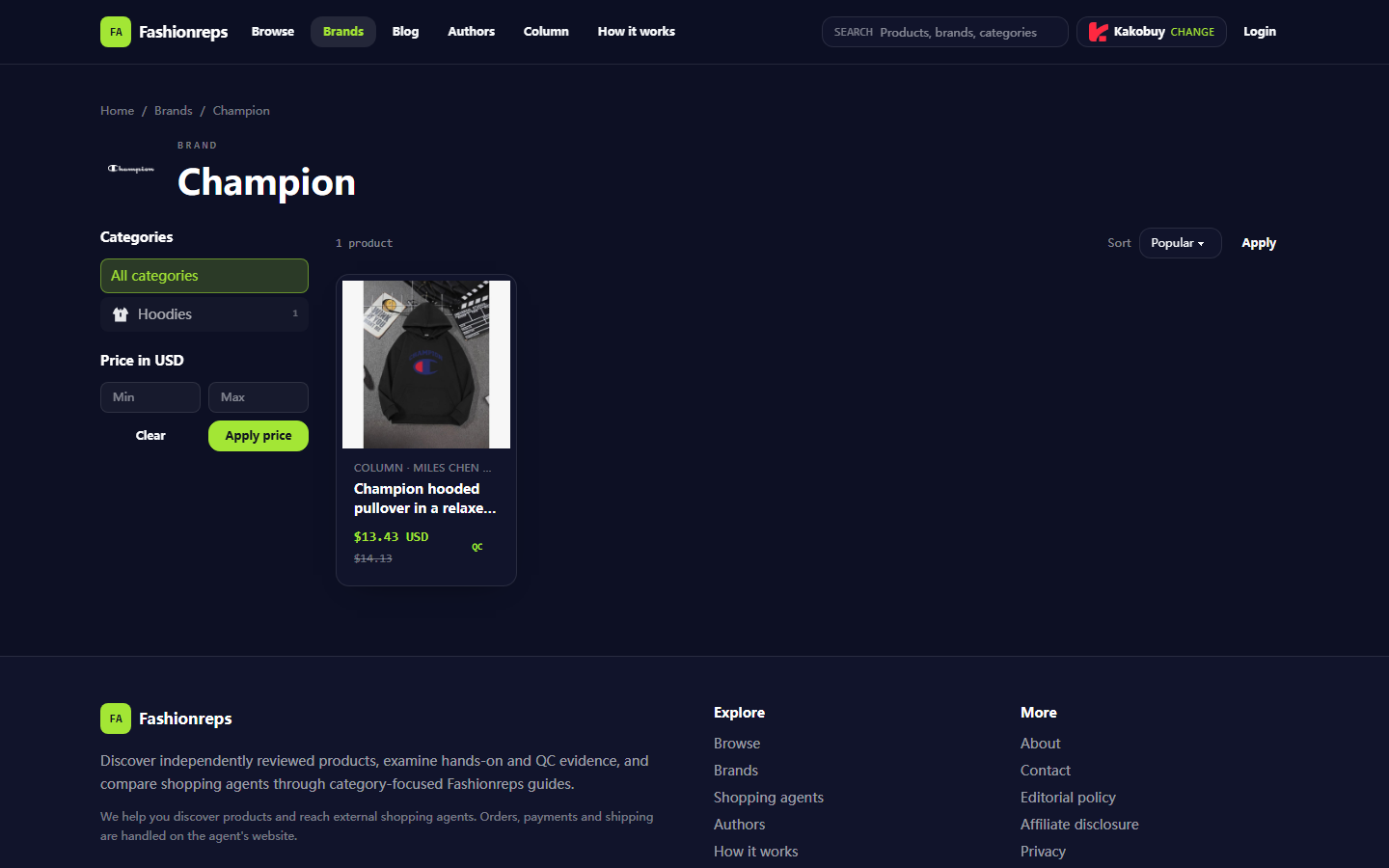
This article uses a Champion hooded pullover sample currently visible on the fashion-reps page for verification. The page shows the sample is in the Hoodies category, with a reference price of $13.43, and the page also displays a 351–399 gram weight range and QC access. The above price, weight, and access points are time-sensitive information from the page snapshot, with a verification date of October 14, 2026; actual inventory, final price, shipping, taxes, and order availability still need to be reconfirmed on the chosen shopping agent website. 🙂

What this champion hoodie comparison helps users decide
After reading, you should be able to do the following:
- Identify the specific Champion item to compare, not just a brand name.
- Record color, size, quantity, and destination to avoid drawing wrong conclusions under different conditions.
- Determine whether the fashion-reps page provides discovery and verification access points, or already offers complete order support.
- Check product details, QC photos, payment status, logistics, and after-sales access points item by item on other platforms.
- Pause ordering when key evidence is missing, rather than substituting a low price or a single product image for complete verification.
This content is not suitable for those who already have a complete order number, warehouse photos, or after-sales tickets and need to handle specific parcel disputes. Those issues should go directly through the order and customer service channels in the actual shopping agent account. This article also does not treat the reference information displayed on fashion-reps as any platform's promise of stock, authenticity, quality, or shipping. 🔎
First fix product, color, size, and destination conditions
The same Champion fall and winter hoodie may correspond to different inventory records, weight, warehousing status, and shipping costs across different colors, sizes, or quantities. Before comparing, at least save the following information:
- Product name: Champion hooded pullover.
- Product category: Hoodies.
- Color: Use the options on the specific product page; don't just write "gray" or "black".
- Size: Record the size system used on the page, and be prepared to check actual measurements.
- Quantity: One piece versus multiple pieces may correspond to different bundling and shipping conditions.
- Destination: Fill in the actual receiving country or region.
- Currency: Note the USD reference price for now; check the locally displayed currency and exchange rate before payment.
- Verification time: Save the page date and screenshot to identify price or status changes.
The currently visible Champion brand page on fashion-reps shows only 1 product sample, with the page summary giving a reference price of $13.43 (previous reference price was $14.13) and indicating a 351–399 gram weight range. This information helps establish a comparison baseline, but it alone cannot prove a certain size is still in stock, nor can it be used to calculate the final landed cost.
It is recommended to create a simple product identification record: product title, page location, color, size, reference price, weight, QC access visibility, selected shopping agent, and verification date. If any one key field cannot be matched to the same product, do not put data from two platforms in the same comparison row yet.
Product and QC access points verifiable on the fashionreps page
From the provided page snapshot, fashion-reps's role is closer to product discovery, category browsing, and a shopping agent entry point. The Champion brand page shows the product name, category, reference price, weight range, and has a QC access point; the page also states that the on-site Buy button will redirect to the user's chosen shopping agent.
This leads to an important distinction:
- The fashion-reps page can help you find the product sample and enter the subsequent shopping agent path.
- Order creation, payment, warehouse intake, QC photos, shipping, and logistics typically happen on the selected shopping agent website.
- The reference price on the page is not the final payment amount and does not include destination country shipping, taxes, or possible processing fees.
- The QC label indicates the page provides a related access point or prompt, not that every color and size already has available, complete physical QC photos.
Therefore, after clicking QC, you should continue to check what it actually opens: does it correspond to the current product, does it include the current color and size, can the photos clearly show the body, drawstrings, print, cuffs, and major defect areas, and is the page still accessible. If the access point opens to a blank page, a dead link, a label-only page, or content that doesn't match the product, the QC status should be recorded as "verification incomplete."
The page also lists multiple selectable shopping agents, including Superbuy, Mulebuy, Sugargoo, CSSBuy, CNFans, Pandabuy, etc. This list only proves the page provides a selection entry point, not that each agent currently supports the same product, the same payment method, the same route, or the same after-sales policy. 🧾
Product evidence and support paths to verify item by item on other platforms
When comparing other platforms, first confirm whether the comparison target is really the same product, not another hoodie from the same brand. It is recommended to check in the following order:
Step one is product identity. Verify the product title, product images, color options, size options, and seller or source identifier. If there are only similar images without enough name, specification, or option information, it cannot be confirmed as the same item.
Step two is QC evidence. Confirm whether the platform provides physical photos, the order or warehouse status corresponding to the photos, and whether you can request handling if obvious problems are found. Having just a "QC" button with no viewable content cannot be considered as having completed QC.
Step three is order support. Check whether the platform can display order statuses such as created, paid, purchasing, warehoused, QC, return/exchange, or canceled. If these statuses only appear in customer service conversations, save the ticket number and handling time; do not rely solely on verbal promises in chat.
Step four is shipping and after-sales. Confirm whether the platform explains route restrictions, parcel billing method, declaration requirements, who pays taxes, the return/exchange window, and rejection conditions. Logistics and customs conditions vary by destination and cannot be directly inferred from another country's order experience.
Step five is evidence retention. Save dated records of the product page, QC page, order page, and policy pages, but mask name, address, phone, payment information, and full order number. Do not publicly share complete shipping labels or account screenshots. 🔐
How to put QC photos, link status, and ordering steps in one table
To avoid mistaking "seeing the product" for "safe to order," you can use a verification table to record two paths. "Unconfirmed" in the table is not a negative judgment, but a reminder that you don't yet have enough evidence to complete your decision.
| Verification Item | Currently Visible Info on fashion-reps | What to Confirm on Other Platforms | Ordering Judgment |
|---|---|---|---|
| Product identity | Champion hooded pullover, classified under Hoodies, page shows 1 product sample | Do title, images, color, size, and source point to the same item | If any key field is inconsistent, pause comparison |
| Reference price | Page shows $13.43, previous reference price was $14.13 | Final product price, exchange rate, service fee, and payment amount | Treat it only as a baseline, not the landed cost |
| Weight | Page shows 351–399 gram weight range | Actual warehousing weight, packaging weight, and chargeable weight | Need destination and route conditions to estimate shipping |
| QC access | QC label or entry point visible on page | Can it open physical photos of the corresponding item, and cover current color and size | Pause on blank page, wrong item, or missing photos |
| Order access | Buy button enters selected shopping agent | Can agent still create order, accept payment, and show status | Access point available does not mean order is confirmed |
| Order support | Page states orders and logistics handled by agent site | Order status, customer service tickets, return/exchange window, and route policy | Must be confirmed within agent account |
| Logistics and customs | Page snapshot does not provide destination-specific promises | Available routes, shipping fees, taxes, declaration, and restrictions | Do not substitute page reference info for real-time policies |
The core of this table is to separate "discovery access" from "fulfillment support." fashion-reps can serve as a front-end discovery and filtering page, but actual evidence involving payment, warehouse QC, shipping, and after-sales should be verified in the selected shopping agent account.
Data sources and applicable conditions for the two platforms
Here, "two platforms" should not be simply understood as two websites that both directly take orders. A more accurate comparison is: fashion-reps handles product discovery and agent selection entry, while the other platform handles the actual order or service. If the so-called "other platform" is just another product catalog without order, QC, or customer service evidence, it should not be described as a complete purchasing channel.
The fashion-reps sample is suitable for these situations: you need to first browse Champion product categories, view basic product summaries, understand whether the page provides QC prompts, and select a subsequent shopping agent. It is not suitable for directly proving inventory, final shipping costs, destination country taxes, or after-sales results.
Other platforms are only suitable for substantive comparison when they can provide corresponding product details, an accessible order process, and clear support policies. If a platform only offers low prices, blurry images, or unverifiable sources, a lower price does not mean it has an advantage in QC and order support.
The editorial judgment is: for this type of fall and winter hoodie, the focus of comparison should be on whether the evidence chain is complete, not the number of pages. If product identity, QC photos, order status, and after-sales paths are scattered across different pages, users need to confirm whether they belong to the same product and the same order. 🌐
When to stop comparison if the page lacks evidence
If any of the following situations occur, it is recommended to stop the current comparison and wait for additional information:
- Only brand and product images can be seen, and color or size cannot be determined.
- Reference price exists, but it is not stated whether it is the current price or includes service fees.
- QC access point exists, but opens to blank, dead, or mismatched content.
- Other platform cannot explain product source, seller, or actual order handler.
- Shopping agent selection button is visible, but cannot enter a valid product or order page.
- No route, billing, tax, or restriction information for the destination.
- After-sales window, cancellation conditions, or quality dispute handling cannot be found.
- The page requires you to publicly share order, payment card, passport, or complete shipping label to continue verification.
Stopping the comparison does not mean judging the product as bad; it means the current information is insufficient to support a reviewable purchase decision. At this point, you can record the missing fields, wait for the page to recover, wait for the agent to provide an official explanation, or switch to a product with more complete evidence. ⏸️
Pre-order action checklist after completing verification
Before confirming the order, do a final check in the following order:
- Open the Champion product page again to confirm title, color, size, and product status still correspond to the target sample.
- Record the current price, and distinguish product price, agent service fee, domestic shipping, international shipping, and possible taxes.
- Open the QC access point to confirm the photos or description correspond to the current product, not another color, size, or old order.
- Enter the selected shopping agent's order page to confirm purchase status, payment status, and cancellation conditions.
- Check destination available routes, chargeable weight, parcel restrictions, declaration requirements, and tax responsibility.
- Save necessary page records while masking personal information, payment details, and full order number.
- Only proceed to payment when product identity, QC evidence, payment path, and after-sales conditions are all reviewable.
If you ultimately cannot confirm QC content or order support, do not continue ordering just because the reference price is low. At best, the current information supports using fashion-reps as a discovery and filtering entry; it cannot alone replace real-time order, warehouse, and logistics verification through a shopping agent.